Find decision makers. Confirm the role before outreach.
Start with the right legal company, search available business contacts by job title, then confirm who owns your specific buying question. A relevant title is a research lead—not proof of authority.
Company shortlistedQuestion to answerPerson to investigateNext conversation
Research question
Who can help us understand the German operation?
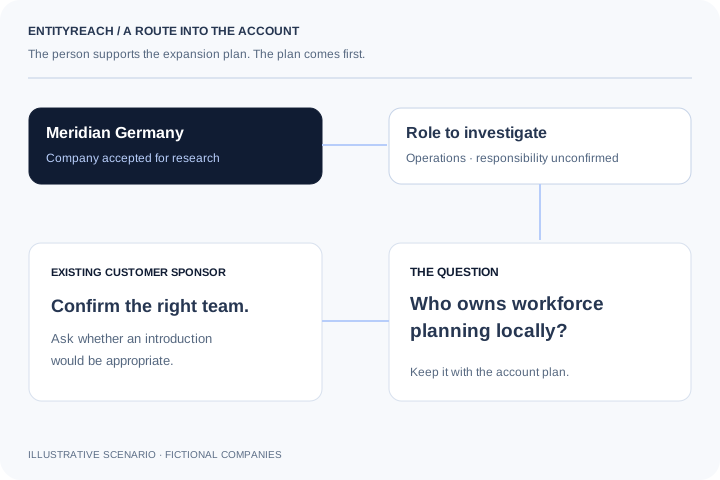
“Start with your relationship
Your current customer may be able to confirm the local team, agreement scope and whether an introduction makes sense.
To find decision makers in a company, first identify the legal entity and the decision you need to understand. Search for a relevant role, verify its remit, then keep any remaining authority question open.
Research: An operations or functional owner
Question to confirm: Which team owns this process at the selected legal company?
Confirm the function and legal-company remit. A group-level title may not cover the local operation.
Next evidence step
Confirm the employer and legal-company remit before revealing contact details.
An operations or functional owner: Which team owns this process at the selected legal company? Confirm the function and legal-company remit. A group-level title may not cover the local operation.
An IT or technical evaluator: Who reviews integration, security and deployment requirements for this use case? Technical influence and purchasing authority can sit with different people. Record both questions separately.
Procurement or the existing account sponsor: Is this purchase local, centralised or already covered by the group agreement? Confirm the named entities and agreement scope. Shared ownership is not proof of shared procurement.
This local planning aid neither searches people nor sends or stores your choices. No outreach is sent. Live contact search requires sign-in and service access. A title, employer match or contact detail is not proof of purchasing authority.
Match the role to the question you need answered.
Contact Discovery: research evidence and account planning decisions
Role hypothesis
Possible contribution
Question to confirm
Operations leader
May understand the operational problem.
Who owns the process at this legal company?
IT leadership
May evaluate integration and deployment.
Which team reviews the technical requirements?
Procurement
May clarify the buying route.
Is purchasing local or covered by a group agreement?
Existing account sponsor
May offer context or an introduction.
Who is the appropriate person to speak with next?
Shortlist the company. Then find a route.
01
Confirm the candidate
Start with a company that fits your territory and offering, then resolve its legal identity.
02
Review available contacts
Search an optional job title or leave it blank. Review the confirmed profiles and search details; use Continue searching when more profiles remain.
03
Keep person and purpose together
Add an appropriate returned contact to the draft plan, review the notes and save an explicit next action.
Use cases
Research a person with a clear purpose.
Local buying question
Find out whether the related entity buys separately.
The right contact may be a local operations owner, regional procurement participant or an existing sponsor who can explain the structure.
Next actionConfirm responsibility before treating a title match as the buyer.
Keep a person with a purpose.
01
Confirm the company before the person.
A contact from a similarly named company or another group entity can lead the conversation in the wrong direction. Start with the legal identity, country and company profile associated with the shortlisted account.
02
Search a role. Inspect how far the search reached.
Use the optional job-title field for the selected company. The current search checks returned profiles against that legal employer rather than filtering only the visible cards. Review the profiles searched, employer checks and any coverage warnings. Continue searching resumes unfinished work without pretending that the first result was exhaustive.
Confirm the selected legal entity and website
Try a broad title or local-language variant
Reveal email or mobile only when you need that detail
03
Save the contact with a purpose.
Add a returned contact to the company plan, review the draft notes and keep the proposed next action. Saving a plan does not send a message or start an outreach sequence.
Account context
The best starting point may be the customer you already know.
A title can suggest who understands a problem, but it does not establish authority. Your current sponsor may help confirm the relevant team, local purchasing responsibility and whether an introduction is appropriate. Use contact data to support that account conversation.
Illustrative account review: six related companies, three in scope, two accepted for research and one proposed introduction. This is a fictional workflow example, not a conversion benchmark.
How can I find relevant contacts within a customer’s group?
Confirm a shortlisted legal company, open Find contacts and search an optional job title. Review the returned employer and role, continue searching when more profiles remain, then confirm responsibility through account research. A contact match does not establish budget or purchasing authority.
Can I find decision makers by job title?
You can inspect and filter available job titles to identify people to investigate. A title does not prove purchasing authority, budget ownership or responsibility for your specific use case; confirm those details through account research.
Does the job-title filter search the whole contact database?
The current Find contacts control starts a company-scoped search, not just a filter over five visible contacts. It checks available profiles against the selected legal employer and job-title query. Work is bounded per request; Continue searching resumes an incomplete search. The result does not represent every employee.
Can I search titles in another language?
Try a broader title or local-language variant in a new search. Titles are reviewed against the returned profile; an empty result can reflect wording, employer confirmation or limited source coverage. Do not treat a single unsuccessful query as an exhaustive search.
Is contact data available for every group entity?
No. Contact discovery requires sign-in, an accessible company with a verified website and the relevant service access. Profiles that name another employer or do not confirm the intended legal employer are excluded. Email and mobile availability vary.
Which roles should I research for account expansion?
Start from the problem and the question you need answered. Operations, IT, procurement or an existing account sponsor may each be relevant for different reasons. Use these as hypotheses, not a fixed decision-maker list.
Can I save a contact to an account plan?
Use Add contact to plan to stage returned details with your company notes and proposed next action. Review the draft, then save the company plan. The action does not send a message to the contact.
Does EntityReach send outreach messages automatically?
No. Contact research supports account planning. Adding a person to your notes or saving a next action does not send email, start a sequence or request an introduction.
What if no suitable person is returned?
Check the legal entity and company website, broaden the title or continue if the search is incomplete. Search details distinguish profiles searched from employer-confirmed contacts. If the role remains unresolved, ask your existing sponsor who owns the process rather than substituting a person from another company.
How does contact research fit the account expansion workflow?
It follows company discovery and fit review. Once a candidate is worth investigating, use contacts or your existing customer relationship to clarify need, purchasing responsibility and a practical next conversation.
When are contact credits used?
Searching previews does not use email or mobile reveal credits. Choosing Reveal email or Reveal mobile uses one credit for that available detail. Missing details use no credit; previously revealed details in the current month remain available under the active plan. Check the workspace allowance before revealing.
Should I look for one decision maker or a buying group?
Start with the person who can answer the next account question, then map the other people who influence technical fit, operations and the buying route. One relevant title is not proof of sole authority. Keep each person with the legal company, question, evidence and next action so the account handoff does not collapse a buying group into a generic contact list.
Explore your customer’s wider group.
Start with a company you serve. Find where your offer could fit next.
 View full-size diagram