Support your account expansion plan with available company contacts. Research a relevant role, confirm responsibility and keep the person with the next action—not as a disconnected lead list.
Company shortlistedQuestion to answerPerson to investigateNext conversation
Research question
Who can help us understand the German operation?
“Start with your relationship
Your current customer may be able to confirm the local team, agreement scope and whether an introduction makes sense.
Contacts for your account plan: research evidence and account planning decisions
Role hypothesis
Possible contribution
Question to confirm
Operations leader
May understand the operational problem.
Who owns the process at this legal company?
IT leadership
May evaluate integration and deployment.
Which team reviews the technical requirements?
Procurement
May clarify the buying route.
Is purchasing local or covered by a group agreement?
Existing account sponsor
May offer context or an introduction.
Who is the appropriate person to speak with next?
Shortlist the company. Then find a route.
01
Confirm the candidate
Start with a company that fits your territory and offering, then resolve its legal identity.
02
Review available contacts
Inspect returned names and titles. Filter the loaded page, review other pages and consider local-language terms.
03
Keep person and purpose together
Add an appropriate returned contact to the draft plan, review the notes and save an explicit next action.
Use cases
Research a person with a clear purpose.
Local buying question
Find out whether the related entity buys separately.
The right contact may be a local operations owner, regional procurement participant or an existing sponsor who can explain the structure.
Next actionConfirm responsibility before treating a title match as the buyer.
Keep a person with a purpose.
01
Confirm the company before the person.
A contact from a similarly named company or another group entity can lead the conversation in the wrong direction. Start with the legal identity, country and company profile associated with the shortlisted account.
02
Read original roles in context.
Review available names and job titles. Filter the currently loaded page using role fragments or local-language terms, then inspect other pages. The filter does not search the whole provider database.
Five contacts on the loaded page
Up to ten pages available for review
Returned contact details only; no invented roles or emails
03
Save the contact with a purpose.
Add a returned contact to the company plan, review the draft notes and keep the proposed next action. Saving a plan does not send a message or start an outreach sequence.
Account context
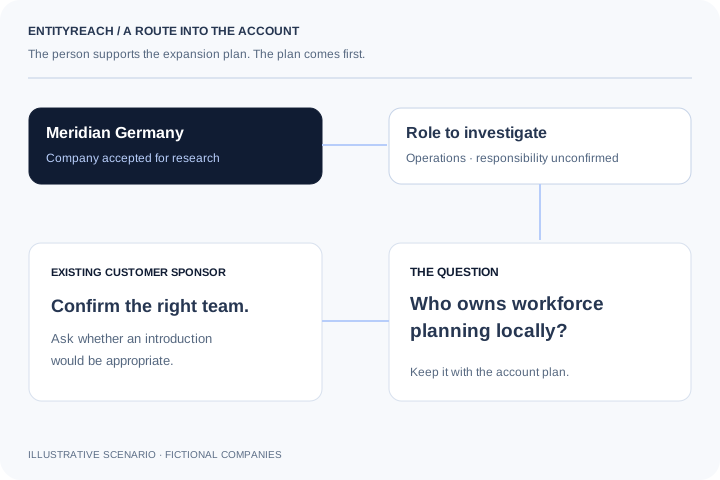
The best starting point may be the customer you already know.
A title can suggest who understands a problem, but it does not establish authority. Your current sponsor may help confirm the relevant team, local purchasing responsibility and whether an introduction is appropriate. Use contact data to support that account conversation.
Illustrative account review: six related companies, three in scope, two accepted for research and one proposed introduction. This is a fictional workflow example, not a conversion benchmark.
How can I find relevant contacts within a customer’s group?
First identify and confirm a company worth investigating. Open its available contacts, review roles and keep a relevant person with the company plan. Research contacts in the context of a defined account question rather than starting with a generic list.
Can I find decision makers by job title?
You can inspect and filter available job titles to identify people to investigate. A title does not prove purchasing authority, budget ownership or responsibility for your specific use case; confirm those details through account research.
Does the job-title filter search the whole contact database?
No. It filters the five contacts on the currently loaded page. Up to ten pages can be reviewed. A page with no matching title does not establish that the company has no suitable contact.
Can I search titles in another language?
Try title fragments and local-language terms when reviewing the loaded results. Original titles may differ from the English role you have in mind, so inspect the returned records as well as the filter results.
Is contact data available for every group entity?
No. Detailed contact lookup requires a real company with a resolvable profile ID, sign-in and service entitlement. Names, titles and contact details appear only when supplied by the underlying service.
Which roles should I research for account expansion?
Start from the problem and the question you need answered. Operations, IT, procurement or an existing account sponsor may each be relevant for different reasons. Use these as hypotheses, not a fixed decision-maker list.
Can I save a contact to an account plan?
Use Add contact to plan to stage returned details with your company notes and proposed next action. Review the draft, then save the company plan. The action does not send a message to the contact.
Does EntityReach send outreach messages automatically?
No. Contact research supports account planning. Adding a person to your notes or saving a next action does not send email, start a sequence or request an introduction.
What if no suitable person is returned?
Confirm the company match, review other available pages and try relevant title variants. Keep the role unresolved and ask your existing sponsor who owns the process rather than substituting someone from another company without checking their remit.
How does contact research fit the account expansion workflow?
It follows company discovery and fit review. Once a candidate is worth investigating, use contacts or your existing customer relationship to clarify need, purchasing responsibility and a practical next conversation.
Explore your customer’s wider group.
Start with a company you serve. Find where your offer could fit next.
 View full-size diagram