Explore your customer’s company group structure. Connect parents, subsidiaries and sister companies to the territories, account owners and expansion questions that matter to your team.
Your customer Connected company Select a company to review its context
Try it with your customer
Work the group as a connected account.
01
The tree explains the connection. The list helps you work.
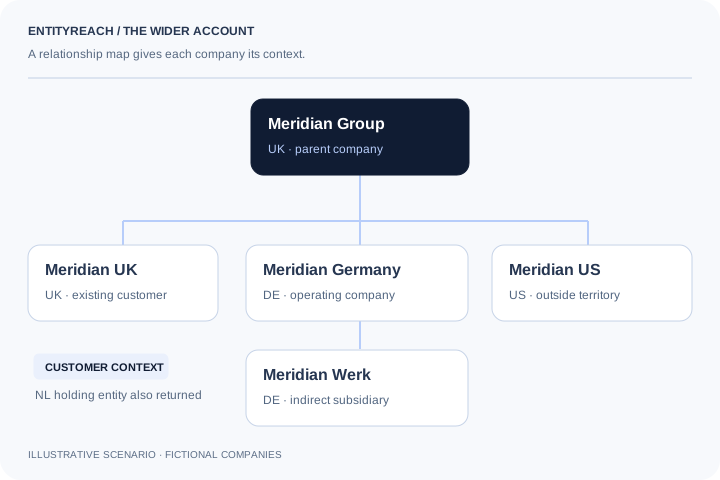
Select a company to see its relationship to your starting account. Direct parents, subsidiaries and sister companies have different commercial implications. The accompanying list gives you a practical way to sort and review larger groups.
Shared country and review-status filters across tree and list
Activity and employee filters when those fields are available
Expandable branches for large groups
Entities without a profile ID remain visible
02
Keep your commercial context with the data.
Mark entities as existing customers, in discussion, shortlisted, to review or not relevant. Add notes on contract coverage and the next conversation you want to have. These are your team’s judgements; EntityReach does not infer that an unlabelled entity is a new customer.
03
A useful starting point, with visible limits.
The returned tree reflects the relationships available from our data provider. Some links may be modelled. View the source classification and retrieval time, and distinguish a lack of returned relationships from confirmed independence.
Use cases
Put the group view to work.
Key account review
The customer name is only one part of the account.
Start with the entity on your agreement. Explore its wider group and mark which companies your team already serves before discussing expansion.
Next actionAsk the account owner which related companies are covered by the current agreement.
Choose the view that answers your question.
Company group explorer: research evidence and account planning decisions
Your task
Use the group tree
Use the company table
Understand the relationship
Follow the parent and intermediate entities.
Compare relationship labels across returned companies.
Review a territory
See where the selected business sits in the group.
Filter country, activity and employee fields when available.
Build the shortlist
Select a connected company for closer review.
Work through entities using customer, discussion and review labels.
Prepare the next meeting
Explain the route from your customer to a candidate.
Export the filtered view and prepare a printable saved account brief.
Account context
A connection explains where to look. Fit decides what makes the shortlist.
A corporate tree gives you the relationship path. Your account knowledge determines whether the company is already served, covered by an agreement or worth a new conversation. Keep both in the same review so the next owner understands why an entity was selected.
A company group structure describes relationships between legal entities, such as a parent and its subsidiaries. For account expansion, it helps you distinguish the company you already serve from connected businesses that need their own coverage and fit review.
How can I explore a company’s corporate group?
Search for the company by name, website or registration number, confirm the matching legal entity and open the returned group. Use the tree to trace relationships and the table to review companies against your territory and account criteria.
How does company group mapping support account expansion?
It reveals related entities that may be missing from the current account conversation. Add your customer and agreement knowledge before deciding which businesses warrant research; a group connection alone does not establish sales potential.
Can I see subsidiaries and sister companies together?
The group explorer can show available parent, subsidiary and sister-company relationships in one returned structure. Which entities appear depends on the relationships available for the selected company.
Can I search using a company website?
Yes. A website can help retrieve possible company matches. Confirm the legal name, country and registration information because one website may represent several companies or a group brand.
Can I filter a corporate group by country?
Yes. Country and review-status filters help narrow the returned group. Activity and employee filters can also be used when those fields are available. Missing data should remain part of your review.
Is the highest company in the tree always the ultimate parent?
No. It is the highest entity in the returned structure. Incomplete source coverage or missing links may prevent it from being a verified global ultimate parent. Inspect the relationship evidence before making that claim.
Can I save account mapping results?
Signed-in users can save groups and company plans. Keep review labels, notes, an owner label and the next action with the account so a later review can build on the earlier work.
Can I export a company group?
The current filtered company view can be exported as CSV. Saved shortlists can also be used in a printable account brief. Review any visible result limits before interpreting the export as the complete group.
How complete is the company group data?
Coverage varies by jurisdiction, source and relationship availability. Some links may be modelled, some entities may lack a detailed profile and large results are bounded. Validate familiar accounts and check the displayed limits rather than assuming complete worldwide coverage.
Explore your customer’s wider group.
Start with a company you serve. Find where your offer could fit next.
 View full-size diagram