Connect corporate relationships with your account knowledge. Discover subsidiaries and sister companies, assess where your offering fits and build a focused account expansion plan.
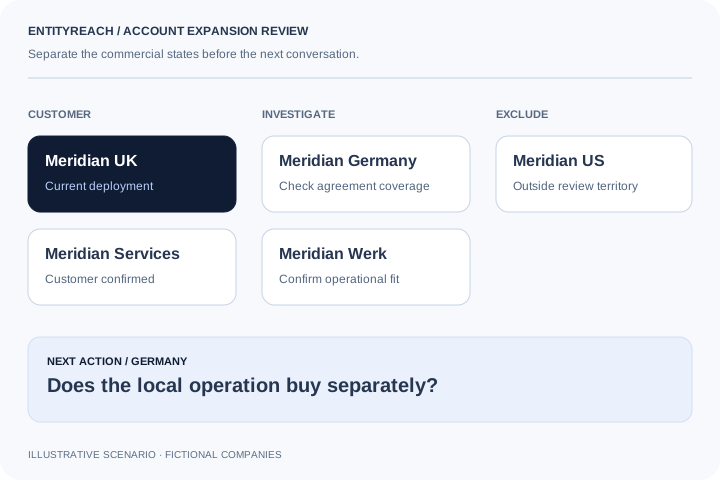
Your UK customer uses workforce scheduling software. A German sister company may be worth investigating if its operations fit and agreement coverage remains open.
Next actionAsk whether the German operation runs scheduling locally and can use the existing agreement.
Account context
White space is a coverage question, not a missing CRM record.
A company may appear absent because your CRM uses a trading name or a parent agreement already covers it. Compare legal identities, product scope and commercial coverage before counting a gap. The strongest output is a candidate the account owner accepts, with an explicit question and next action.
Make the unknowns visible before calling them pipeline.
Existing customers2
To investigate2
Already covered1
Outside territory1
Illustrative six-company account review: two customers, two companies to investigate, one company covered by an agreement and one outside territory. No revenue or conversion outcome is implied.
Turn group knowledge into an owned plan.
01
Corporate connections add context to your CRM.
A CRM records the relationships your team has entered. EntityReach helps you investigate corporate relationships around a customer, including entities your team may not yet have reviewed. You can use it without connecting a CRM.
02
Build a shortlist that an account owner can defend.
For each candidate, retain the relationship to your customer and a specific reason for further research. Your shortlist is a list of businesses to review, not a claim that every business needs your product.
Relevant countries and operating activities
Existing-customer and conversation labels
Unknown purchasing authority kept explicit
Owner, notes and a next action saved with the group
03
Find a person who can move the question forward.
Open available contacts for a company you have explored. Review the job title and company match, then use your existing customer relationship to confirm who owns the relevant function. A contact record gives you a starting point; it does not prove purchasing authority.
04
Bring the evidence into your account review.
Create a printable account brief with your selected companies, their connections, your notes and source information. The brief is a fixed snapshot, so colleagues know which information the discussion was based on.
05
Measure progress beyond searches.
Use EntityReach to support conversations and account planning. In your pilot, track relevant entities discovered, account-owner acceptance, introductions requested and resulting opportunities. These outcomes are more useful than the number of nodes in a tree.
Move from company data to an account decision.
Account expansion: research evidence and account planning decisions
What you know
What remains to establish
Useful output
A related entity exists
Does its activity fit the problem your product solves?
A short fit rationale or an exclusion reason.
The entity is in territory
Is it served, in discussion or covered by another agreement?
A confirmed coverage state or an unresolved question.
Your customer can provide context
Who owns the problem and how does the entity buy?
An introduction route or purchasing check.
A candidate looks relevant
What action will the owner take next?
A saved company plan with a specific follow-up.
A focused path to the next conversation.
01
Research an existing customer
Tell the AI assistant which company you serve and what you sell. Use returned evidence to guide the group review.
02
Qualify the white space
Check territory, activity and commercial coverage. Separate unconfirmed candidates from existing customers and exclusions.
03
Make the next move concrete
Save the relevant company, notes and owner label. Use contact research or an existing sponsor to support the next conversation.
Account expansion means growing your relationship with an existing customer. EntityReach focuses on researching related companies within that customer’s group, then helping your team assess fit and plan a next step. It does not automatically qualify those companies as revenue opportunities.
How does EntityReach support an account expansion strategy?
Start with AI-assisted company research, explore the returned group, review relevant entities and save account notes and next actions. Your team supplies the offering, territory, existing coverage and commercial judgement that make the plan actionable.
What is white space analysis in account planning?
White space analysis compares where your offering could be relevant with where it is already sold or covered. Group relationships provide the entity side of the comparison; your CRM, agreements and account team supply commercial coverage.
Is a company missing from the CRM an expansion opportunity?
Not necessarily. It may use a different legal name, already be covered by a parent agreement or fall outside your territory. Confirm identity, coverage and fit before labelling it as an expansion candidate.
How is group expansion different from upselling?
Upselling usually involves a larger or more capable purchase by an existing buyer. Group expansion investigates other related legal entities that could benefit from your offering. Either route still needs a confirmed problem, buying process and commercial fit.
Who is this workflow designed for?
Enterprise sales, key account managers, account planning teams and customer success teams can use it to research the wider group behind an existing customer. It is most useful when corporate relationships are relevant to the next account conversation.
Can the AI assistant research expansion candidates?
Yes. Describe your customer, offering and territory to guide research. Review the returned evidence and open the relevant company in the explorer to continue. The Free plan includes three homepage AI searches per calendar month; each follow-up also uses one search.
Does EntityReach automatically reconcile CRM and contract coverage?
No. The current workflow uses manual review labels and account notes. Your team must confirm CRM identity, eligible group companies and product scope. The downloadable planning worksheet supports a manual entity-by-offering review.
When should I look for contacts?
After identifying a relevant company and the question you need to answer. Available contact data can help you investigate an appropriate role, while an existing customer sponsor may help confirm responsibility and an introduction route.
How should I measure an account expansion pilot?
Track matched accounts, reviewed companies, accepted candidates and useful next conversations separately. Qualified opportunities and revenue need confirmation in your commercial process; the size of a corporate group is not a performance result.
Explore your customer’s wider group.
Start with a company you serve. Find where your offer could fit next.
 View full-size diagram